

The ULBHRYNDC Haryana Portal (https://property.ulbharyana.gov.in) is a convenient platform for property-related services such as creating a Property ID, searching Property ID by name in Haryana, paying property tax, downloading a No Dues Certificate, and raising objections—all without visiting a municipal corporation office. To streamline these services, the government assigns unique property IDs to property owners across the state. With this ID, property owners can easily pay property taxes online and generate a No Dues Certificate.
Contents
- 1 Property ID Search By Name Haryana – Introduction
- 2 FAQ
- 2.0.0.0.1 1. How can I get a no-dues certificate from NDC Haryana portal?
- 2.0.0.0.2 2. How much time is required for the property id to be approved?
- 2.0.0.0.3 3. What is the Official Website Property Tax Haryana?
- 2.0.0.0.4 4. How can I check my property ID in Haryana?
- 2.0.0.0.5 5. What is the full form of NDC in property?
- 2.0.0.0.6 6. How can I make Property ID Search By Name Haryana?
Property ID Search By Name Haryana – Introduction
The ULBHRYNDC Haryana Portal https://property.ulbharyana.gov.in/ serves as a means to Create Property ID, Property ID Search By Name Haryana, Pay Property Tax, Download No Dues Certificate, Raise Objections etc. without visiting any Municipal corporation office. For this, the government is providing unique property IDs to the property owners in the state. Using the unique property Id Haryana the owner can pay property tax online, generate No Dues Certificate etc.
If you don’t know your property ID and want to perform property id search by name Haryana you have to first make profile on ULBHRYNDC portal. Once registered on official portal property owner can pay property tax online by entering property details like the Owner of the property or mobile number for Property ID Search Haryana. If you have a new or old property but you don’t have a property ID, you can also create a property id in Haryana online through the ULBHRYNDC Haryana portal. To create a new property id you have to follow the steps provided in the article here.
How To Create Property ID Haryana – ULB Haryana Registration
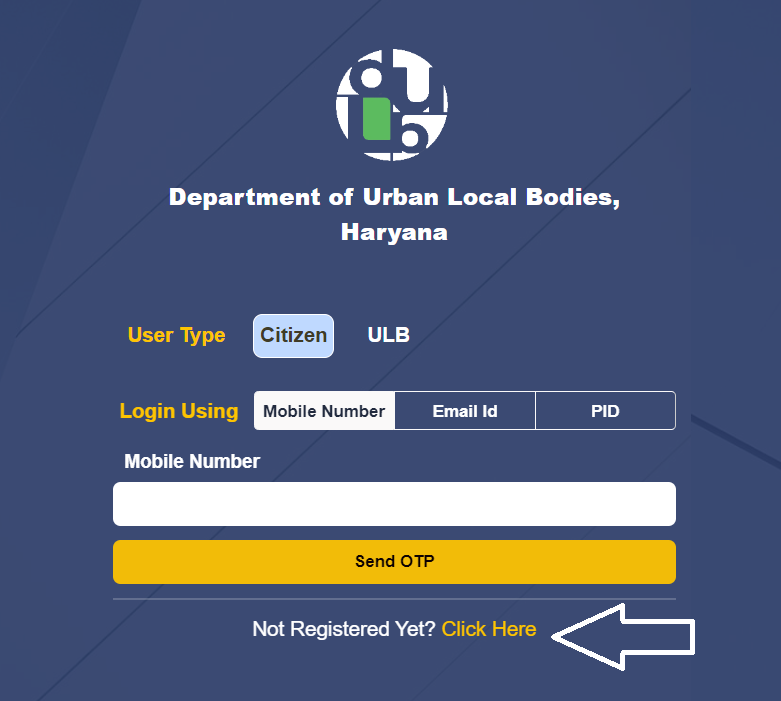
- Step 1: Open the ULBHRYNDC Haryana website https://property.ulbharyana.gov.in/
- Step 2: Click on the link which says ‘Not Registered Yet? Click Here‘ as show in the image below
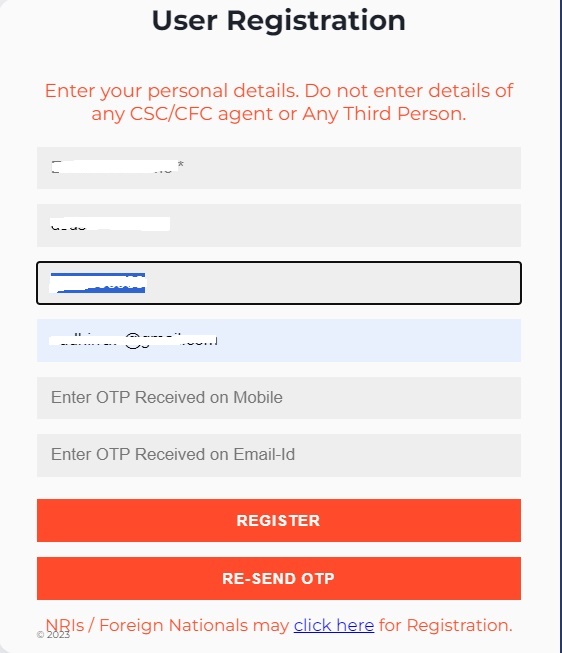
- Step 3: Enter your Full Name, Father/Husband’s Name and Mobile Number, Email ID then click ‘Send OTP for Verifiction’
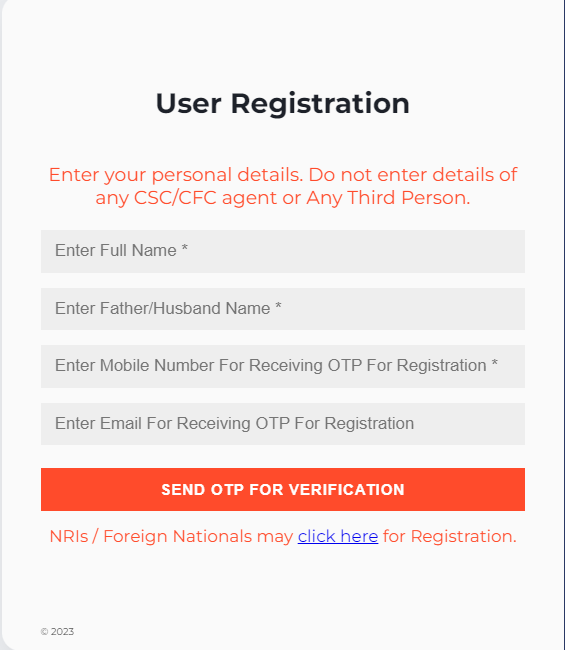
- Step 4: You will receive an OTP on your mobile and Email ID, Enter the OTP on the screen and Click Register button
Process For Property ID Search By Name Haryana
Once the account is created on ULB Haryana Portal, One can login with the Mobile number provided at the time of registration and perform Property ID Search By Name Haryana.
Step 1: Open the ULBHRYNDC portal again 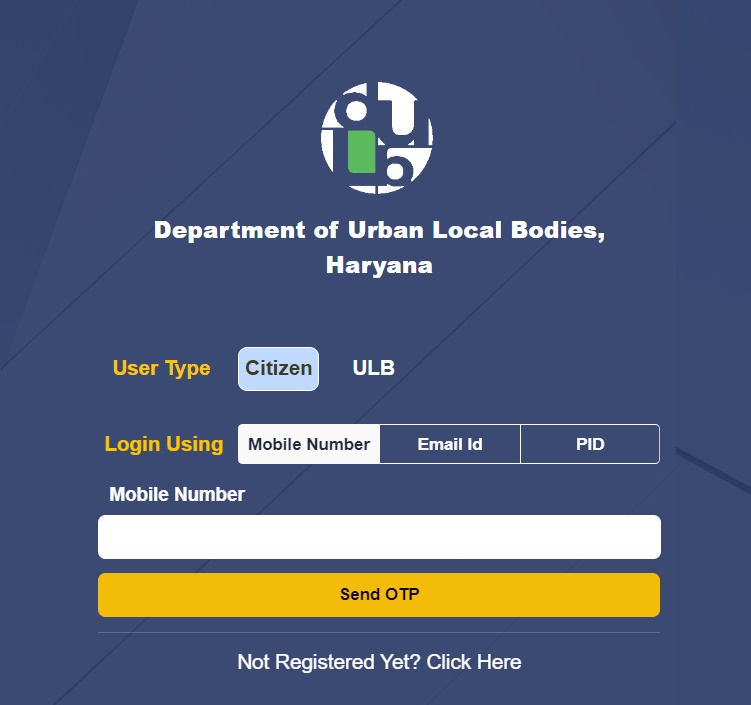
Step 2: Select User type as ‘Citizen‘, Login Using ‘Mobile Number‘, Enter the Mobile number, and Click ‘Send OTP‘ you will receive an OTP on registered mobile number
Step 3: Enter the OTP in the space provided and Click ‘Verify OTP & Submit‘, You will get access to ULB Haryana portal
Step 4: For Property ID Search by name Haryana, click on Search Property from Menu, Enter details like Municipality, Colony, Property category and Owner Name and Click on Search button For Property ID Search Haryana. If your property ID already exists it will be listed below and you can check the details by Clicking the Select button.
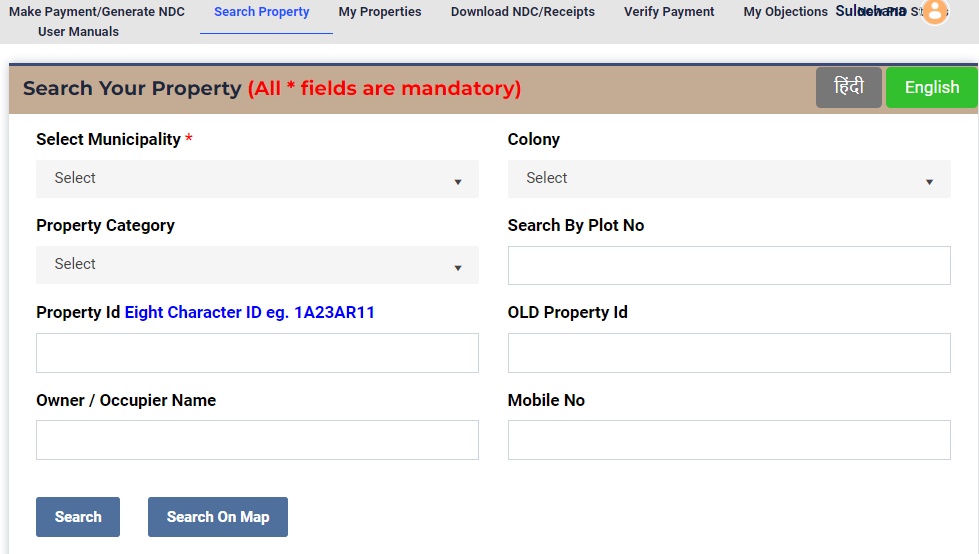
Step 6: Once the details of the property are Open you can check various dues against the property and make payment
Create Property ID ULB Haryana
If the Property is not listed and the property id is not created you can Create a New ULBHARYANA Property ID in NDC Haryana Portal by clicking on the link as shown in the image below.
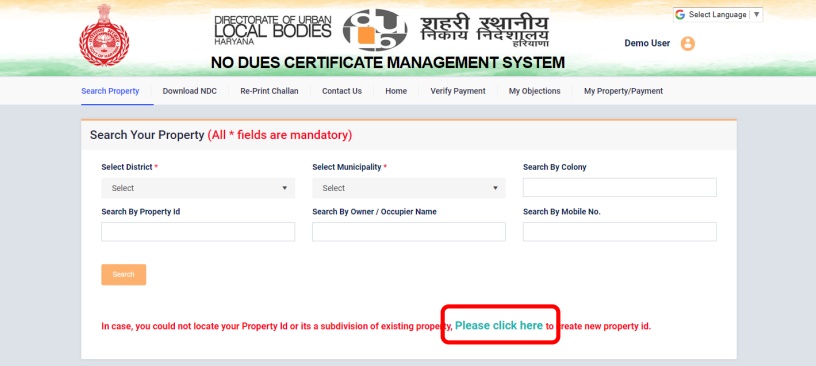
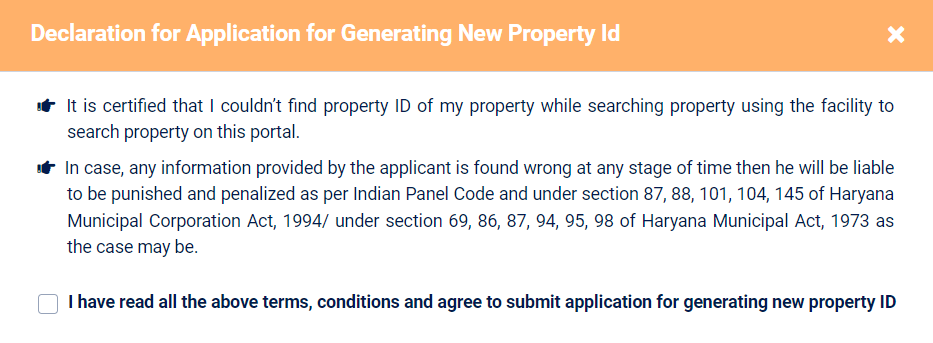
Step 1: A declaration box will open, click the check box and click the button Click Here to Proceed after reading the terms and conditions carefully.
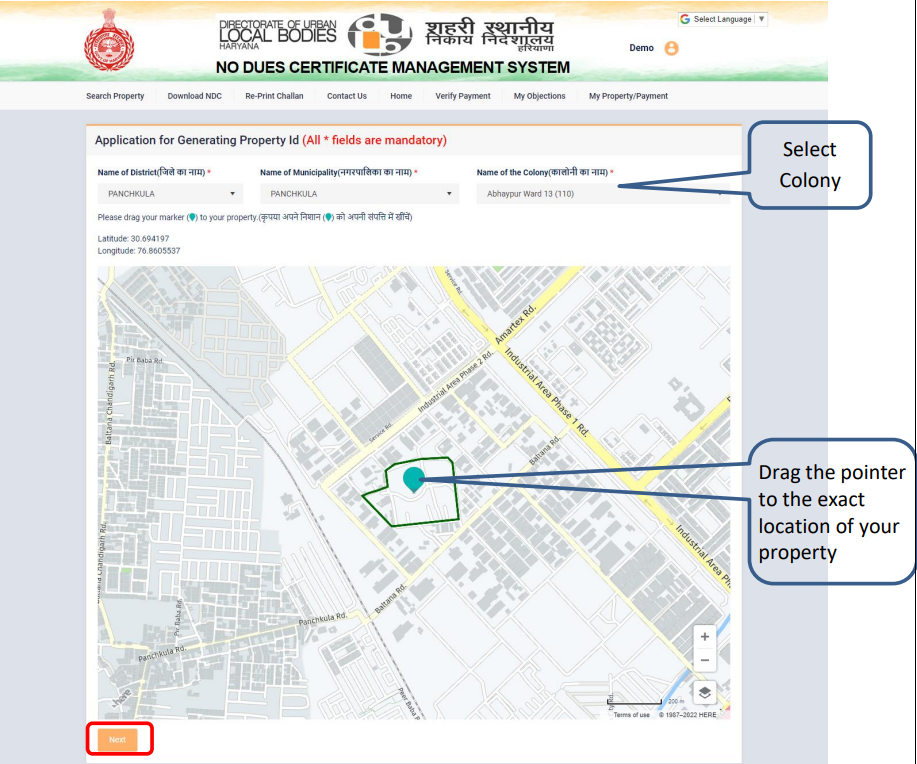
Step 2: Now Enter the Name of the District, the Name of the Municipality, and the Name of the Colony
Step 3: In the map mark the property by moving the marker to your property location and clicking Next
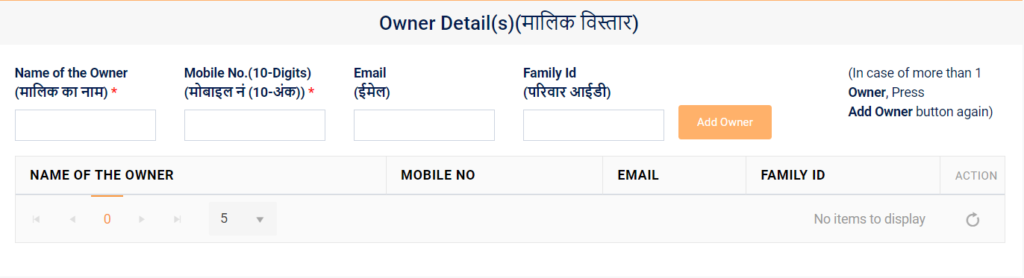
Step 4: Enter the Name of the Owner, Mobile No, Email, and Family ID. If the property has more than one owner click on Add Owner button and add details of the other owners also.
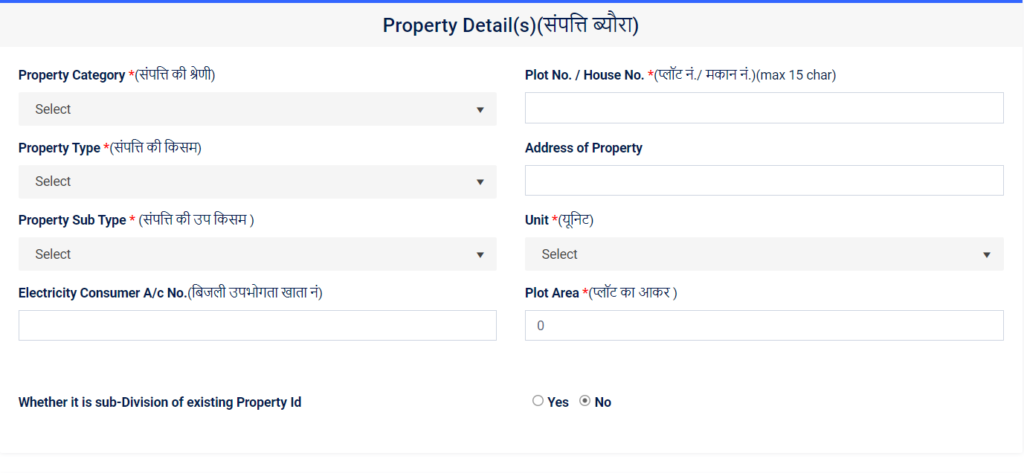
Step 5: Now Add details of the property, Property Category (Residential, Commercial, vacant, etc.), Plot No, Property Type, Address of Property, Property Sub Type, Unit(Sq yards, Sq Mtr or Sq Ft), Electricity Consumer A/c No, Plot Area
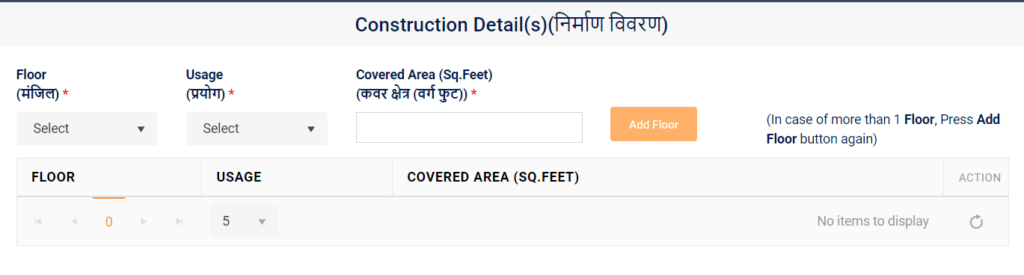
Step 6: Next you have to add construction details of the property like how many floors and usage like rented or self-occupied
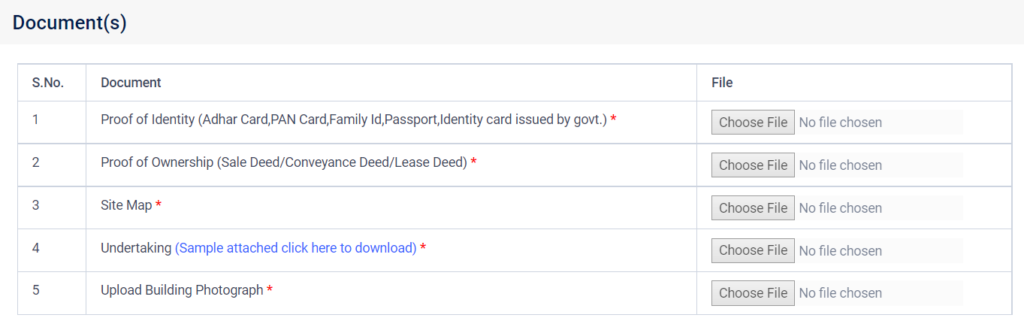
Step 7: In the final steps documents are to be uploaded Identity Proof of Owner(Aadhaar, PAN, Passport, Family ID), Proof of Ownership(Sale Deed, Registry), Site Map(Naksha), Undertaking signed by Owner(Sample is provided in the website), Building Photograph and Now Click Submit Request after uploading all documents.
In this way, a new property id is created in Haryana. Once the property is created successfully you can pay property tax online in Haryana and get a discount for cashless transactions also.
How to Make ULB Haryana Property Tax Payment?
Once you have successfully created a Property ID in NDC Haryana Portal, you can check pending dues against your property, pay property tax haryana online, download receipts, verify payments, make objections or generate a No Dues certificate online through NDC Haryana portal . To pay pending property tax dues one must follow the steps mentioned below:
- Open the ULB Haryana Website https://property.ulbharyana.gov.in/
- Select Login type “Citizen”, Enter your registered mobile number and click the Login button
- An OTP will be received on your mobile, Enter the OTP in the space provided and click “Verify OTP and Submit“
- Now Click “Search Your Property” from the top menu
- Select District, Municipality, Enter your property ID, and click Search
- Now your property is listed, click on the “Select” button
- All the details of your property like owner name, area of the property, number of floors, and pending dues are now visible
- Click on the “Make Payment” button on the bottom and pay ULB Haryana Property Tax Payment
ULBHRYNDC Contact Number: 09115103181
FAQ
1. How can I get a no-dues certificate from NDC Haryana portal?
Step 1: Open NDC Portal Haryana https://property.ulbharyana.gov.in/
Step 2: Choose Login type Citizen and Enter registered mobile number and Click Login button
Step 3: Now wait for OTP to come on your registered mobile number. Enter the six digit OTP in the space provided and click Verify OTP and Submit.
Step 4: Click Download NDC/Receipts
Step 5: Check for the last payment and Click Print NDC button to download No Dues Certificate Haryana
2. How much time is required for the property id to be approved?
3. What is the Official Website Property Tax Haryana?
4. How can I check my property ID in Haryana?
5. What is the full form of NDC in property?
6. How can I make Property ID Search By Name Haryana?