



Introduction to EPF Form 10D
All the members of the Employee Provident Fund Organization(EPFO) are automatically linked to the Employees’ Pension Scheme (EPS). Under the EPS scheme, a member becomes eligible for pension after retirement at the age of 58 years. A member can apply for a monthly pension by filling out EPF Form 10D online. The pension amount that the member receives on retirement depends on the monthly pensionable salary and total pensionable service.
Earlier employees were not able to fill EPF Form 10D Online, and they have to visit the EPFO office to apply for an EPF pension. But now employee has the option to fill EPF Form 10D online by sitting at home, the only requirement is the member has a valid UAN number. The member must have his details updated in the UAN Members portal before submitting EPF Form 10D Online and applying for a monthly EPS pension. The member can also update the nominee online in the EPF portal online before applying for pension if the nominee details are not up to date in the Members portal.
How to Fill EPF Form 10D Online & Apply for EPF Pension
1. Open UAN Member’s portal https://unifiedportal-mem.epfindia.gov.in/memberinterface/
2. Enter your UAN Number, Password, Fill out Captcha, and Click Sign In
3. Click on Online Services and Select Claim(Form 31,19, 10C&10D)
4. In the Bank Account Field, Enter your bank account number and click Verify
5. A popup will appear which says” I have verified the displayed Bank Account details of mine and I understand that the claimed amount will be credited to this Bank Account by EPFO.” Click Yes
6. Click “Proceed For Online Claim“
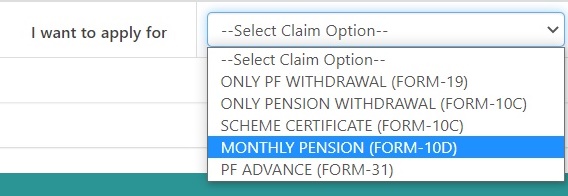
7. Select “Monthly Pension Form 10D” in I want to apply for column
8. Scheme Certificate: Select Yes if you have a Scheme Certificate and No if you don’t have such a document.
9. Deferred Pension: Select Yes if you want to postpone Pension and Select No if you want to start pension immediately. If you select Yes in Deferred pension Yes you are provided with two options Year 59 or Year 60 through which you can postpone your pension by 1 year and 2 years respectively.
10. Employee Address: Fill full address of the Employee here, make sure the Bank Account of the Employee and address of the Employee are in the same state.
11. Bank Details: Select Bank, Enter Account Number, IFSC Code
12. Upload Scanned Cheque(Image size should be between 100 to 500 Kb)
13. Click on Check Box which says” I hereby consent to provide my Aadhaar Number, Biometric and/or One Time Pin (OTP) data for Aadhaar based authentication for the purpose of establishing my identity“. Now Click the Get Aadhaar OTP button.
14. Enter the OTP received on your mobile and click Submit
EPF Form 10D PDF Download
The members who are not tech-friendly have the option to download EPF Form 10D PDF and Submit the EPF Penson Form offline. Download EPF Form 10D PDF from here
How to Fill EPF Form 10D PDF
Field 1: By Whom the Pension is claimed
The applicant has to mention any one of the following in this field.
- Member
- Widow/widower
- Adult / orphan
- Guardian
- Nominee
- Dependent parents
Field 2: Types of Pension
- Retirement Pension – Monthly pension on retirement at the age of 58 years
- Reduced Pension – Monthly pension at a concessional rate of 4% p.a. starting from the age of 50 years
- Disability Pension – Early monthly pension amount due to permanent and complete disability
- Pension for Widow and Children – Monthly pension for the widow and children of a member after his death
- Orphan Pension – Monthly pension benefit to the sons/daughters of the deceased member till the age of 25 years,
- Nominee Pension – Monthly pension to the nominee after the death of the member in case there is no family member
- Dependent parents – Monthly pension for dependent parents in case the family (spouse and children) or member dies without a nominee.
Field 3: Member Information
- Name of Member
- Gender
- Marital Status
- Date of birth/age
- Father’s / Husband’s name
Field 4: EPF account information
- RO
- Office
- Establishment code
- Member’s account number
Field 5:
- The name and address of the establishment in which the member was last employed,
Field 6: Date of leaving the job (dd/mm/yyyy)
Field 7: Reason for leaving job
Field 8: Address for communication
Field 9: Option for 1/3 of pension
Field 10: Principal refund option. (put a tick)
Field 11: Enter the name of the nominee
Field 12: Family Information
Field 13: Date of death of the member (if applicable)
Field 14: Details of bank accounts opened
- Banks’ name
- branch Name
- Full postal address/PIN
Field 15: Information about the scheme certificate which is with the member, if present
- If the scheme certificate is received, give the following information:
- Scheme Certificate Control No.
- The authority that issued the Scheme Certificate
Field 16: If pension is being given under EPF, 1995, then the PPO number and Issuer RO/SRO to be mentioned
Field 17: Complete the documents (Give details as per instructions)
The applicant must authenticate the information by signing the form and signed by the employer. The second part of the form must be filled by the employer only