


Introduction
In this article you will learn the step-by-step process to Aadhar Card Address Change Online by visiting the MyAadhaar website myaadhaar.uidai.gov.in and uploading the supporting documents.
Anyone can now update the address on their Aadhaar Card Online by sitting at home, you don’t have to visit Aadhar Center for updating their address from now on. If you have a mobile and internet you can easily update the address on the Aadhaar Card at your ease.
If you have valid ID proof according to the list provided by the UIDAI you can update your address online by visiting the Aadhar Self-Service Update portal and entering your details. But, If you don’t have valid ID proof you can still update the address on your Aadhar Card by requesting the address verification letter.
Both methods to update Aadhaar address are described in detail below:
Follow the steps mentioned below to update the address on your Aadhaar Card Online if you have a valid address proof mentioned in the list on the UIDAI website
1. Steps to Aadhar Card Address Change Online With Valid ID
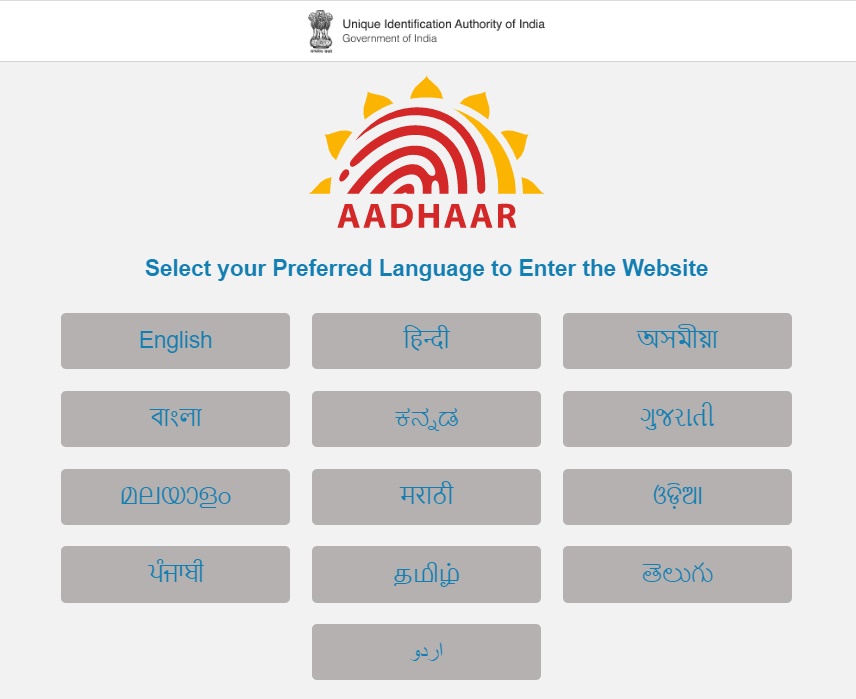
Step 1: Open the website https://uidai.gov.in/ and choose the language you prefer
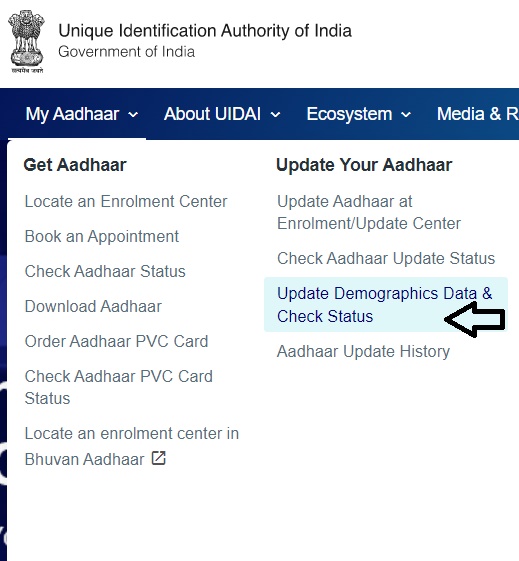
Step 2: From the menu bar Click on the ‘My Aadhaar’ tab, then select “Update Demographics Date & Check Status“
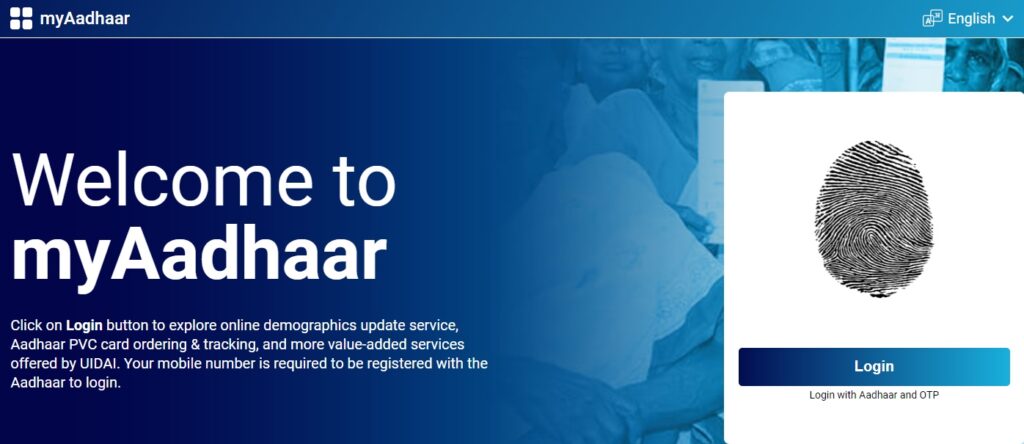
Step 3: A new window will open as shown in the image below. Click on Login with Aadhaar and OTP You can also visit https://myaadhaar.uidai.gov.in/ directly to reach here
Step 4: Now enter your Aadhaar Number or Virtual ID, then fill captcha code as shown and Click ’Send OTP’. A one-time password will be sent to the registered mobile number. Enter the OTP received in the box provided and click ‘Login’
Step 5: Now you are provided with two options ‘Update Address via Address Proof’ and ‘Update Address via Secret Code’. Click on Update Address via Address Proof. Secret Code is for those who have ordered an address verification letter and received a secret code.
Step 6: Fill in the details of the address
Step 7: Upload the document for proof of address in PDF or JPG format(File size must be less than 2 MB)
Step 8: Review your Updated Address, Confirm the address by checking ‘I hereby confirm that I have read instructions carefully and click Submit
A URN number is generated on the next screen, this URN number can be used to check the status of the address update request. In my case, the address was updated in just 3 days. In this way, you can update the address on your Aadhaar card online if you have a valid document.
Aadhaar Address Update With Address Validation Letter
- Open UIDAI website
- Click on My Aadhar from the Menu bar and select ‘Update your address online
- A new window will open, Now Click on ‘Request Address Validation Letter’
- Enter your Aadhaar number, Fill Captcha code and click ‘Send OTP’
- An OTP will be received on the phone number linked with Aadha Card, Enter the OTP in the space provided, Click Login
- Now Enter the Aadhar number of the Address verifier
- The address verifier will receive an SMS on the registered mobile number with a link to verify
- Open the link received on mobile Logs in with your Aadhaar and gives consent
- Now will receive a link on your mobile with the SRN number, Click the link, Enter the SRN number and verify the address and Submit the Request
After successfully completing the process you will receive a letter (via post) on the address mentioned with a secret code. Now you have to again log in to the Aadhaar website and enter the secret code. After entering the secret code and verifying the address you will receive a URN number. The URN number is used to check the status of the Aadhaar updating request.
Check Aadhaar Address Update Status
Step 1: Open Website https://uidai.gov.in/
Step 2: Click My Aadhaar
Step 3: Click on ‘Check Online Adress Update Status’ or directly visit https://ssup.uidai.gov.in/checkSSUPStatus/checkupdatestatus
Step 4: Enter 12 Digit Aadhar Number
Step 5: Enter URN Number
Step 6: Fill Captcha code
Step 7: Click Check Status
List of Aadhar Card Address Change Documents Valid for Updating Address in Aadhaar Card
- Passport
- Bank Statement/Passbook
- Ration Card
- Voter Card
- Driving License
- Pensioner Card
- Freedom Fighter Card
- Post Office Account Statement/Passbook
- Electricity Bill (Not older than 3 months)
- Water Bill (Not older than 3 months)
- Telephone/Landline Bill (Not older than 3 months)
- Government Photo ID Cards/Service Photo ID Card issued by any PSU
- Receipt of Property Tax Paid (Not more than 1 year old)
- Credit Card Statement With Adress Printed (Not older than 3 months)
- Insurance Policy
- A signed Letter having a photo from Bank on the letterhead
- A signed letter having a photo issued by the registered company on their letterhead
- A signed letter having a photo issued by the recognized educational institute on letterhead
- NREGA Job Card
- Arms License
- Pension Card
- Freedom fighter card
- Kisan Passbook
- CGHS/ECHS Card
- Income Tax Assessment Order
- Vehicle Registration Certificate
- Registered Sale/Lease/Rent Agreement
- Address Card having Photo issued by the Department of post
- Caste or Domicile certificate with photo issued by the State Government
- Certificate of Address by Village Panchayat head
- Certificate of Address which has your photo attested by the MP, MLA, or Gazetted Officer or Tehsildar on Letterhead
- School Identity Card
- SSLC book having a photograph
- Address Pin issued by UIDAI
- Passport of spouse
- Passport of Parents (In case of a minor)
- School Leaving Certificate of TC having name and address mentioned
- A marriage Certificate Issued by the Government having an address
- Gas connection bill ( Not more than 3 months old)
- Certificate of Identity containing Name, Address, and Photo issued by recognized education institute signed by Head of Institute on UIDAI standard certificate format for enrolment/update
- Certificate of Identity containing Name, Address, and Photo issued by Employees Provident Fund Organization (EPFO) on UIDAI standard certificate format for enrolment/update.
- Bhamashah Card