
Skip to content
-
Subscribe to our newsletter & never miss our best posts. Subscribe Now!
  • https://www.facebook.com/
  • https://twitter.com/
  • https://t.me/
  • https://www.instagram.com/
  • https://youtube.com/
DeshBhar DeshBhar DeshBhar

Update

DeshBhar DeshBhar DeshBhar

Update

  • Home
  • Government
  • Contact Us
  • Home
  • Government
  • Contact Us
Subscribe
Close

Search

aadhaar biometric unlock online
Government

Simple Ways To Aadhaar Biometric Unlock/Lock To Avoid Fraud

By Ankit Singh
3 Min Read
0

In order to use Aadhaar biometric unlock/lock feature one must have Aadhar Virtual ID active, The detailed process to create Aadhaar virtual ID, Aadhaar biometric lock, Aadhaar biometric unlock via Aadhar self service update portal and via sms are explained in the article.

Contents

  • 1 Aadhaar Introduction
  • 2 Why Aadhaar Biometric Lock is Required
  • 3 Create Aadhaar Virtual ID Online
  • 4 Aadhaar Biometric Unlock Online via Aadhar Self Service Update Portal
  • 5 How To Generate Virtual ID via SMS
  • 6 Aadhaar Biometric Unlock via SMS
  • 7 How To Lock Aadhaar via SMS
  • 8 How To Enable Biometric Lock in Aadhaar via SMS
  • 9 To Disable Biometric Lock

Aadhaar Introduction

Aadhaar is the unique 12-digit identification number issued to Indian residents by the Unique Identification Authority of India (UIDAI) Indian residents. It contains sensitive personal information and serves as proof of identity and address. Aadhaar captures biometric data of an individual such as fingerprints and iris scans to establish a unique identity for each individual.

Why Aadhaar Biometric Lock is Required

The Aadhaar biometric lock feature was introduced to enhance the security and privacy of an individual’s biometric data stored in the Aadhaar database. As Aadhaar card contains sensitive biometric information, such as fingerprints and iris scans, which are unique to each individual. By enabling the biometric lock, individuals have more control over their biometric data, ensuring that it cannot be accessed or used without their explicit consent. By locking the biometrics details, individuals can prevent any unauthorized access by any person or entity from using their biometric information for authentication purposes. This feature acts as an additional layer of protection against identity theft and fraudulent activities.

Create Aadhaar Virtual ID Online

In order to create Aadhar Virtual ID follow the steps mentioned below:

  • Open the Aadhar self service update portal https://myaadhaar.uidai.gov.in/
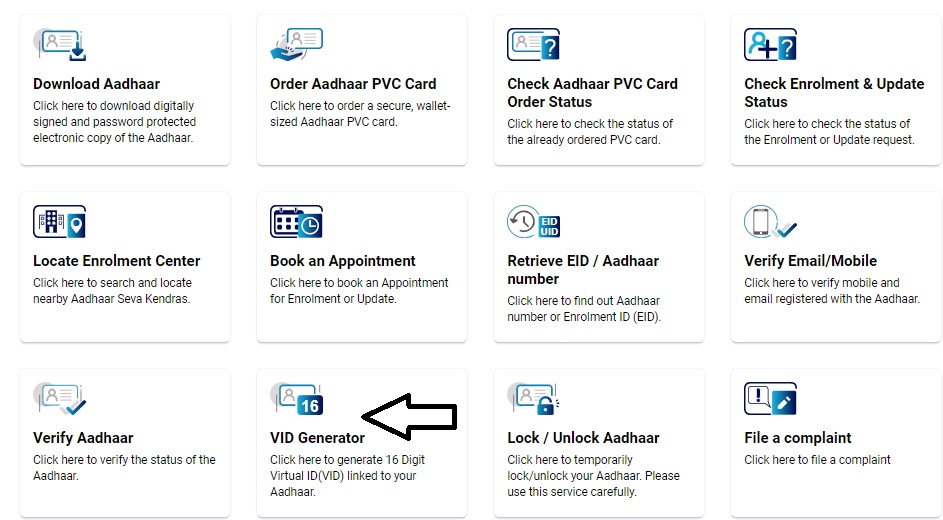
  • Click on VID Generator to create Aadhaar Virtual IDaadhar self service update portal
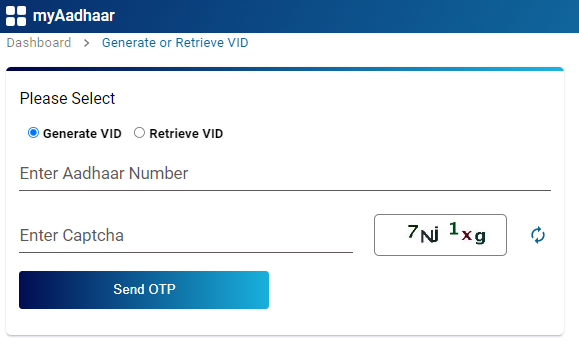
  • A new window will open, Fill your Aadhaar number, Enter captcha as shown on image and Click “Send OTP” buttoncreate vid
  • A six digit OTP will be received on the registered mobile number
  • Enter the received OTP on to the space provided
  • A sixteen digit virtual ID is now generated, you will also receive the Aadhaar virtual id onto your registered mobile number.

Once you have created a Aadhaar Virtual ID, you are now able to lock Aadhaar biometric lock, Aadhaar biometric unlock.

Aadhaar Biometric Unlock Online via Aadhar Self Service Update Portal

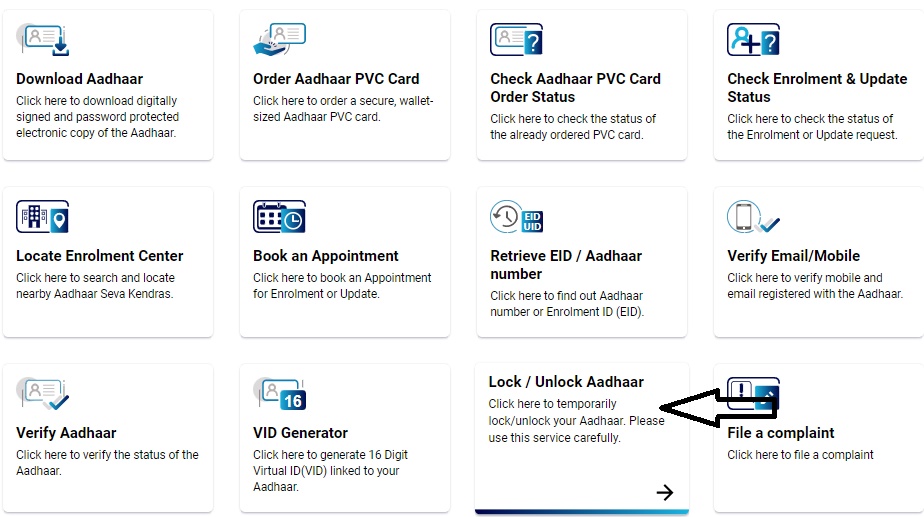
  • Open Aadhaar Self Service portal again https://myaadhaar.uidai.gov.in/aadhaar biometric unlock
  • Click on Lock/Unlock Aadhaar
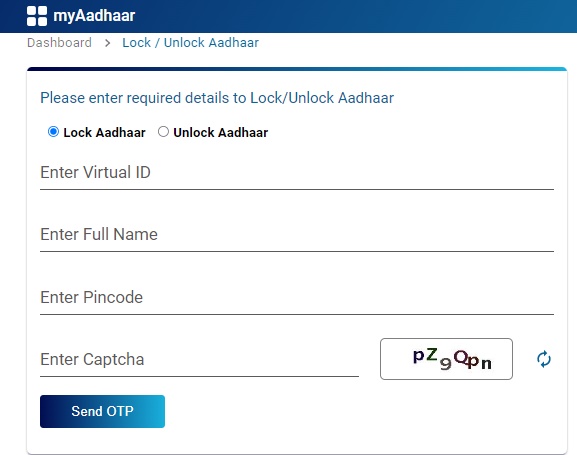
  • A new window will open, Select Lock Aadhaar or Unlock Aadhaar from Radio button
  • Enter your Aadhaar virtual ID received on your mobile number, full name, Pincode and Captcha , Click on Send OTPaadhaar unlock
  • An OTP will be received on registered mobile number, Enter the OTP in the space provided, Agree t terrms and conditions and Click submit button to lock Aadhaar biometrics.

How To Generate Virtual ID via SMS

To generate Virtual ID for your Aadhar Card, send the message in following format to 1947

GVID<SPACE>Aadhaar-Number-last-4-digits

For example If the last 4 digit of your Aadhar number are 8434 then type GVID 8434 and send it to 1947

Aadhaar Biometric Unlock via SMS

To Unlock Aadhaar card through SMS you need to have Virtual ID with you, Send following SMS to 1947 from Aadhaar registered mobile number.

Step 1: Send OTP request, type message in below format and send it to 1947

GETOTP<space>LAST 6 digit of Virtual ID

For exampe if last six digit of your Virtul ID are 765432, then type GETOTP 765432

Step 2: Unlock Aadhaar

UNLOCKUID<space>LAST 6 diguit of Virtual ID<space>Six digit OTP

For example OTP received is 552345, then type UNLOCKUID 765432 552345

How To Lock Aadhaar via SMS

In order to Lock Aadhaar send the following SMS to 1947

SMS 1 : GETOTP<SPACE>Aadhaar NUMBER-last-4-digits

SMS 2 : LOCKUID<SPACE>Aadhaar NUMBER-last 4-digits<SPACE>OTP-6-digits

How To Enable Biometric Lock in Aadhaar via SMS

SMS 1: GETOTP<SPACE>Aadhaar-Number-last-4-digits

SMS 2: ENABLEBIOLOCK<SPACE>Aadhaar-Number-last-4-digits<SPACE>OTP-6-digits

To Disable Biometric Lock

Step 1: Send SMS to get OTP

 GETOTP<SPACE>Aadhaar-Number-last-4-digits

Step 2: Send SMS to disable biometric lock

DISABLEBIOLOCK<SPACE>Aadhaar-Number-last-4-digits<SPACE>OTP-6-digits

Author

Ankit Singh

Ankit Singh is a passionate blogger based in Madhya Pradesh, India. With a strong desire to share valuable information, he has established himself as the owner of the popular website deshbhar.com. As a B.A graduate, Ankit possesses a deep understanding of various subjects, which enables him to provide insightful content to his readers.

Follow Me
Other Articles
Previous

Check CBSE Result 2023 For 10 & 12 – cbseresults.nic.in

Next

Karnataka Gruha Lakshmi Scheme – ಕರ್ನಾಟಕ ಗೃಹ ಲಕ್ಷ್ಮಿ ಯೋಜನೆ – sevasindhugs.karnataka.gov.in

Recent Posts

  • TV Actress Sanchita Ugale Dies by Suicide at 22; Investigation Underway
  • Pradhan Mantri Mudra Yojana (PMMY): A Complete Guide
  • SMFG Credit India Personal Loans: All You Need to Know
  • KreditBee Personal Loans: Comprehensive Guide for Easy Borrowing
  • Get Loan Against Car Upto 200% of Car Value
  • గణతంత్ర దినోత్సవ ప్రసంగం – Republic Day Speech in Telugu
  • Republic Day Speech in Hindi – गणतंत्र दिवस पर भाषण – 26 जनवरी 2025
  • Republic Day Speech, 26th January 2025
  • क्रेडिट कार्ड से बैंक अकाउंट में पैसे ट्रांसफर करने के लिए PayZapp Wallet का उपयोग कैसे करें?
  • Aadhar Kaushal Scholarship 2024: विकलांग छात्रों के लिए विशेष छात्रवृत्ति योजना
  • Prefr Personal Loan Apply Online Now – Features & Interest Rates
  • Get Up to ₹7 Lakhs with L&T Finance Personal Loan – Apply Now!
  • How to Transfer Money From PayZapp Wallet to Bank Account
  • Transfer Money From Payzapp Wallet For Free, But Here Is A Catch!
  • 50 Republic Day Quotes

Categories

  • Entertainment
  • Government

Recent Updates

  • TV Actress Sanchita Ugale Dies by Suicide at 22; Investigation Underway
  • Pradhan Mantri Mudra Yojana (PMMY): A Complete Guide
  • SMFG Credit India Personal Loans: All You Need to Know
  • KreditBee Personal Loans: Comprehensive Guide for Easy Borrowing
  • Get Loan Against Car Upto 200% of Car Value
  • గణతంత్ర దినోత్సవ ప్రసంగం – Republic Day Speech in Telugu
  • Republic Day Speech in Hindi – गणतंत्र दिवस पर भाषण – 26 जनवरी 2025
  • Republic Day Speech, 26th January 2025
  • क्रेडिट कार्ड से बैंक अकाउंट में पैसे ट्रांसफर करने के लिए PayZapp Wallet का उपयोग कैसे करें?
  • Aadhar Kaushal Scholarship 2024: विकलांग छात्रों के लिए विशेष छात्रवृत्ति योजना

Categories

  • Home
  • Government
  • Contact Us

Categories

  • Entertainment
  • Government
  • About Us
  • Contact Us
  • Cookie Policy
  • Privacy Policy

Recent Posts

  • TV Actress Sanchita Ugale Dies by Suicide at 22; Investigation Underway
  • Pradhan Mantri Mudra Yojana (PMMY): A Complete Guide
  • SMFG Credit India Personal Loans: All You Need to Know
  • KreditBee Personal Loans: Comprehensive Guide for Easy Borrowing
  • Get Loan Against Car Upto 200% of Car Value
Copyright 2026 — DeshBhar. All rights reserved. Blogsy WordPress Theme
We use cookies on our website to give you the most relevant experience by remembering your preferences and repeat visits. By clicking “Accept All”, you consent to the use of ALL the cookies. However, you may visit "Cookie Settings" to provide a controlled consent.
Cookie SettingsAccept All
Manage consent

Privacy Overview

This website uses cookies to improve your experience while you navigate through the website. Out of these cookies, the cookies that are categorized as necessary are stored on your browser as they are essential for the working of basic functionalities of the website. We also use third-party cookies that help us analyze and understand how you use this website. These cookies will be stored in your browser only with your consent. You also have the option to opt-out of these cookies. But opting out of some of these cookies may have an effect on your browsing experience.
Necessary
Always Enabled
Necessary cookies are absolutely essential for the website to function properly. This category only includes cookies that ensures basic functionalities and security features of the website. These cookies do not store any personal information.
Non-necessary
Any cookies that may not be particularly necessary for the website to function and is used specifically to collect user personal data via analytics, ads, other embedded contents are termed as non-necessary cookies. It is mandatory to procure user consent prior to running these cookies on your website.
SAVE & ACCEPT