


The NDC Haryana Portal (https://property.ulbharyana.gov.in/) is an online platform of Haryana government to provide property-related services conveniently to its residents. It simplifies processes such as property tax payment, creating new property IDs, checking property statuses, and downloading No-Dues certificates, making it easier for property owners to manage their records.
Contents
Services Offered by NDC Haryana Portal
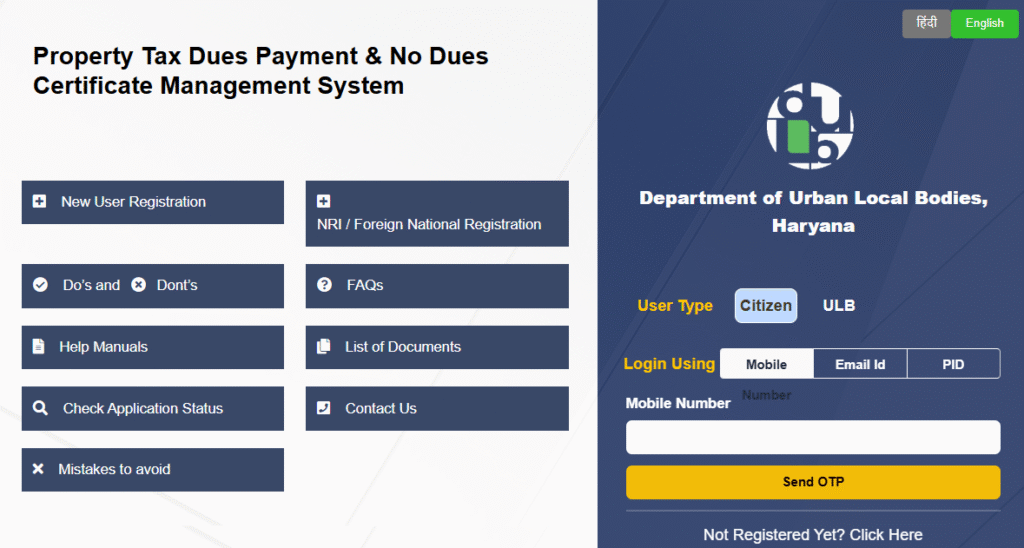
The NDC Haryana portal provides various services, including:
- Creating a new Property ID in Haryana.
- Searching for an existing property ID.
- Paying property tax online.
- Downloading payment receipts.
- Checking the status of No Dues Certificates (NDC).
- Downloading No Dues Certificates.
- Verifying property details and payments.
- Linking property IDs with Family IDs.
- Raising objections regarding property data.
What is a No Dues Certificate (NDC)?
A No Dues Certificate is an official document that confirms there are no outstanding dues or responsibilities for a particular property. This certificate is essential for property transactions like buying or selling. The NDC Haryana Portal enables property owners to easily check the status of their NDC and download the certificate online.
NDC Haryana Update 2024-25
The Haryana government has introduced several benefits for property owners through the NDC Haryana Portal:
- 15% Discount on Property Tax:
Property owners in urban areas can get a 15% discount on property tax for 2024-25 by self-certifying their property details. This offer is valid until 31st March 2025. - One-Time Rebate on Property Tax Arrears:
- A 15% rebate on the principal amount of property tax arrears for 2010-11 to 2022-23 is offered.
- To avail this, property owners must clear all arrears and self-certify their property information by 31st March 2025.
- 100% Interest Waiver on Arrears:
- Complete waiver of interest on property tax arrears from 2010-11 to 2022-23 is available.
- Property owners must clear the arrears and self-certify their property details by 31st March 2025.
In essence, the NDC Haryana Portal reduces paperwork, ensures transparency, and streamlines property-related services.
How to Register on the ULB Haryana Property Tax Portal?
To register on the ULB Haryana portal, follow these steps:
- Visit the Official Website
- Go to the ULB Haryana official property tax payment website:
https://property.ulbharyana.gov.in/
- Go to the ULB Haryana official property tax payment website:
- Click on “New Registration”
- On the homepage, locate and click on the “New Registration” button.
- Enter Your Details
- Fill in the required details:
- Name
- Father’s/Husband’s Name
- Mobile Number
- Email ID
- Fill in the required details:
- Verify Your Mobile Number & Email
- Click “Send OTP for Verification” and enter the six-digit OTP received on your mobile and email.
- Click “Register” to complete the process.
Once registered, you can log in using your registered mobile number. Note that no password is required—each time you log in, you will receive an OTP for verification.
How to Pay ULB Haryana Property Tax Online?
To pay your property tax online via ULB Haryana, follow these steps:
- Open the Property Tax Portal
- Visit the Directorate of Urban Local Bodies, Haryana’s Property Tax Dues Management Portal:
https://property.ulbharyana.gov.in/
- Visit the Directorate of Urban Local Bodies, Haryana’s Property Tax Dues Management Portal:
- Log in to Your Account
- Use your registered mobile number and select “Citizen” as the login type.
- Enter the OTP received on your mobile and click “Verify OTP and Submit”.
- Enter Property Details
- Provide details such as:
- District
- Municipality
- Colony
- Property ID
- Owner Name
- Mobile Number
- Provide details such as:
- Search for Your Property
- Click the Search button to find your property.
- Once found, click Select to view property details, including pending tax dues.
- Make the Payment
- Click on the “Payment” button to proceed with online payment.
Note: If you don’t have a Property ID, you can search by entering your City, Area, and Owner Name to find properties registered under the given name.
How to Create a New ULB Haryana Property ID?
If your property does not have a ULB Haryana Property ID, follow these steps to generate one:
Step 1: Search for Existing Property ID
- Click on “Search Property” from the menu.
- Enter details like District, Municipality, Colony, Property ID, Owner Name, or Mobile Number.
- A list of properties will be displayed.
- If your property is listed, select it and proceed to pay dues.
- If your property is not listed, proceed to create a new Property ID.
Step 2: Create a New ULB Haryana Property ID
- Click on “Please Click Here” to create a new Property ID.
- Read the terms and conditions, check the “I Agree” box, and click “Proceed”.
- Select the District, Municipality, and Colony where your property is located.
- Mark your property on the map for location identification and click Next.
- Select Ownership Type and enter Owner Details. If there are multiple owners, click “Add Owner”.
- Provide Property & Construction Details. For multiple floors, click “Add More” under construction details.
- Upload the required documents in PDF, JPEG, or PNG format (all documents are mandatory).
- Choose the Property ID Request Type:
- New PID Request (Processing time: 10 working days, No fee charged).
- Tatkaal Scheme (For urgent requests).
- Read the Declaration, check “I Agree”, and click “Submit Request”.
Steps to Check NDC Haryana Status and Download No Dues Certificate
Here’s how you can check your NDC status or download the certificate:
- Visit the NDC Portal:
Open the website https://property.ulbharyana.gov.in/. - Log In as a Citizen:
- Enter your registered mobile number and click Login.
- Enter the OTP received on your mobile and click Verify OTP and Submit.
- Generate or Download NDC:
- Properties linked to your mobile number will be displayed.
- Click Generate NDC beside your property or select Download NDC/Receipts from the menu.
- Pay Outstanding Dues:
- If there are any pending dues, clear them before downloading the NDC.
- Click the Download NDC button to generate the certificate.
- Print the Certificate:
- Once generated, the certificate will open in a new window.
- Click the Print button to download or print your No Dues Certificate.
Key Benefits of the NDC Haryana Portal
- User-Friendly Interface:
The portal is designed to make property-related services accessible and efficient. - Transparency:
Property owners can verify payments, check statuses, and raise objections, ensuring clear communication. - Convenience:
Online services save time and effort, eliminating the need for manual paperwork. - Cost Savings:
The discounts and waivers encourage timely payment of property taxes and self-certification.
The NDC Haryana Portal is a significant step by the Haryana government towards digitization and transparency in property management. It empowers citizens to manage their property taxes and documents with ease, contributing to a more efficient governance system.